PDFBookGuide
The Zero-Touch Ops Workbook — Live KPI Dashboard for Client Intake Automation
The Zero-Touch Ops Workbook — Live KPI Dashboard for Client Intake Automation
⚡ Instant download · Printable PDF · Buy once, use forever
Couldn't load pickup availability
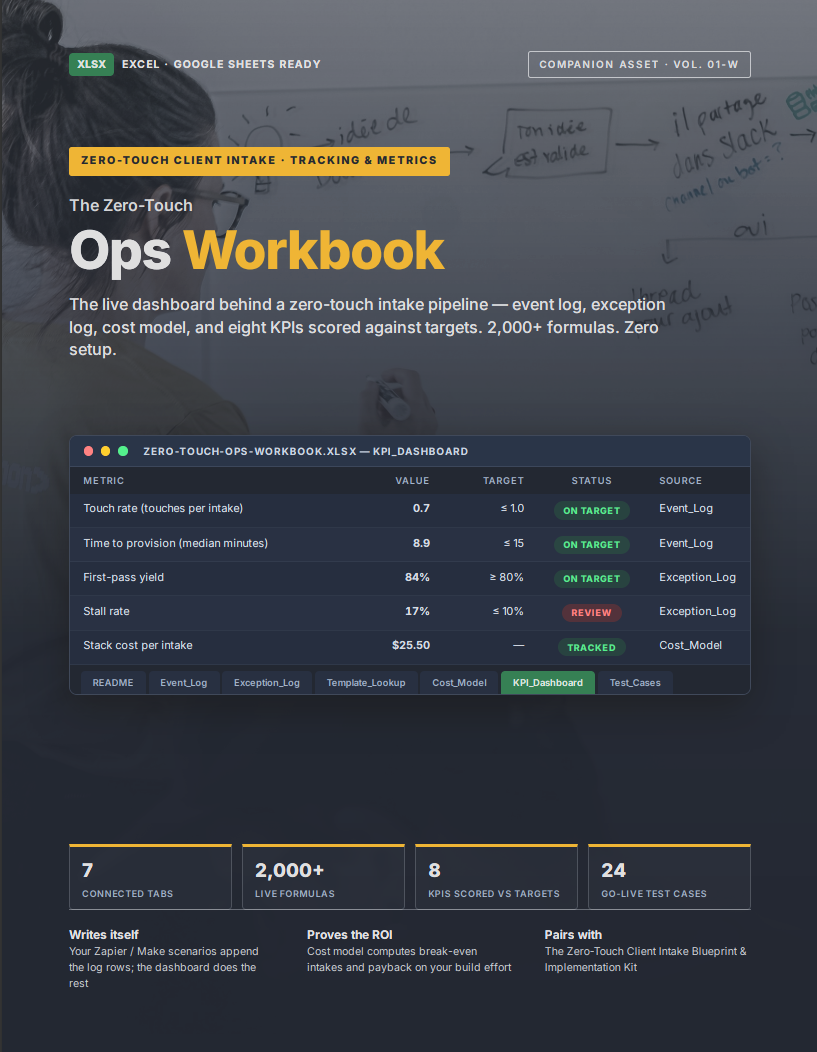
The live dashboard behind a zero-touch intake pipeline. 2,000+ formulas. Zero setup.
If you're automating client onboarding, this workbook is your tracking layer: your Zapier, Make, or n8n scenarios append rows to the logs, and the dashboard scores your entire operation automatically. Open it in Excel or import to Google Sheets — every formula survives both.
Who this is for
Your automations run — but answering "is it actually working?" still costs you an afternoon in scattered logs. This is for you if you're automating client intake, with or without the Blueprint, and want one file that scores the whole operation: every event logged, every exception tracked, every metric red or green at a glance. If you can't improve what you can't see, this is the tracking layer.
7 connected tabs:
- KPI_Dashboard — 8 zero-touch metrics computed live against editable targets, with automatic red/green status: touch rate, time to provision, time to complete, first-pass yield, auto-commit accuracy, exception rate, stall rate, and cost per intake. Plus an exception breakdown by type with counts, open items, and median resolution hours.
- Event_Log — one row per pipeline event; helper formulas compute signature-to-provisioned minutes and provisioned-to-complete business days on their own
- Exception_Log — failure tracking with dropdown-validated types and severities, owners, root causes, and auto-computed hours to resolve
- Cost_Model — enter your stack costs, intake volume, and hourly rate; it computes cost per intake, saving per intake, break-even volume, monthly hours recovered, and payback on your build effort
- Template_Lookup — your service-line → template mapping, readable by your automations
- Test_Cases — a 24-case go-live regression tracker with three run columns and an automatic READY / NOT READY gate
- README — legend, configuration cells, and your tool choices in one place
Grey example rows show the exact format your automations should write; clearly marked blue input cells show exactly where to type. Column orders are documented so connecting an orchestrator takes minutes.
Works standalone as an operations tracker — and it's the exact workbook referenced throughout The Zero-Touch Client Intake Blueprint and Implementation Kit, so it plugs straight into that system if you own it (or when you're ready to).
Instant digital download. One .xlsx file. No macros, no add-ins, no subscriptions.
Instant delivery — how it works
Instant delivery — how it works
Your download link appears immediately after checkout and is also emailed to you. Files are yours to keep — download them anytime, on any device. No shipping, no waiting, no subscription.
Printing & using your PDF
Printing & using your PDF
Every guide is formatted for US Letter and prints beautifully at home in color or black & white. Prefer screens? Use it digitally on any computer, tablet, or phone — fillable worksheets can be completed right in your PDF reader.
Share